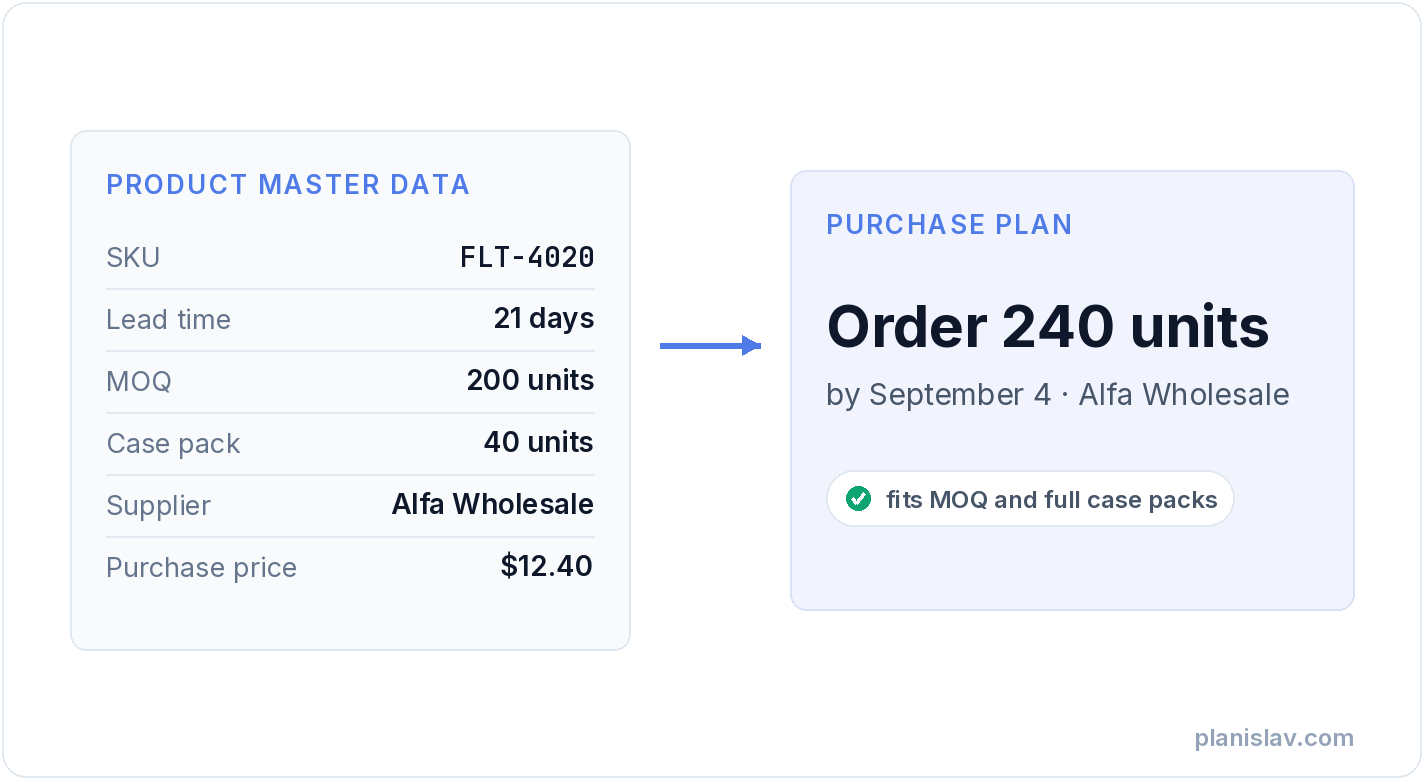
A forecast tells you how much you'll sell. But between "you'll sell 300 units in October" and "order 250 units by September 4 from this supplier" stand a few boring numbers: lead time, minimum order quantity, case pack, purchase price. That's master data — the least glamorous part of purchase planning, and the part that decides whether the plan can actually be executed.
What is master data?
Master data describes your products and your terms with suppliers — as opposed to transactional data, which describes events. Yesterday's sales are a transaction. Stock on hand is a snapshot. The fact that a supplier delivers in 21 days, packs 40 units to a case and won't accept orders under 200 units — that's master data. It changes rarely, but when it's wrong, it corrupts every decision calculated on top of it.
Whatever system runs your warehouse — a desktop ERP installed years ago or a cloud suite — it keeps this information in some form of a product record or item card. The name differs, the idea doesn't: one place where the system holds the truth about a product.
In e-commerce, the key that ties it all together is the SKU — the unique product identifier. Without consistent identifiers you can't connect sales to stock, or a product record to an order — and no analysis gets off the ground.
What master data Planislav uses, and what works because of it
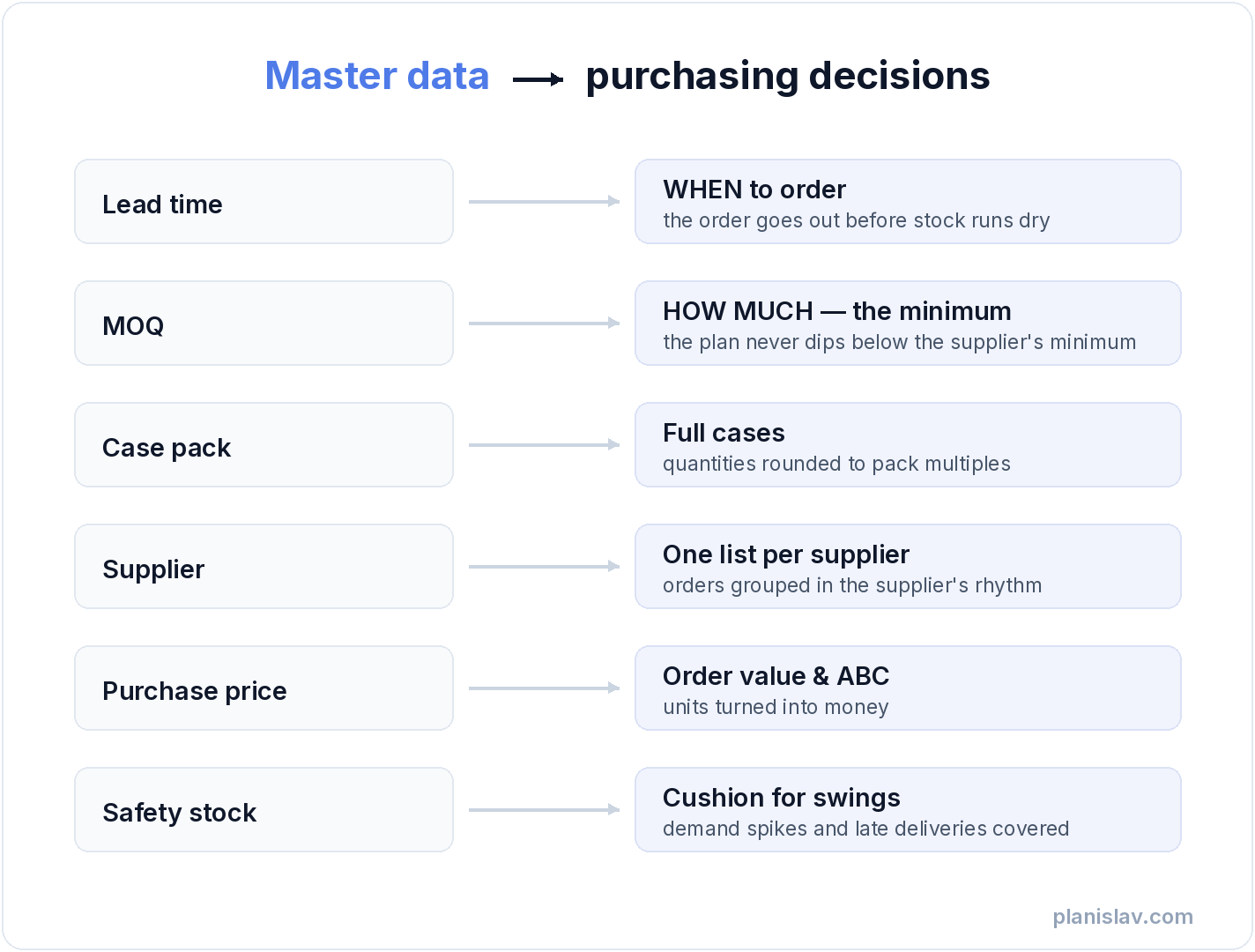
Planislav needs only your sales history to run. But every master data field you add switches on a specific part of the plan:
- Lead time — answers "when to order". The order has to go out early enough for the goods to arrive before stock runs out. For seasonal products this matters twice over: the longer the lead time, the earlier you need to see the peak coming — which is why sales seasonality and lead time always work together. An outdated lead time is the shortest path to a stockout, and a stockout costs more than it seems.
- Minimum order quantity (MOQ) — the floor for "how much to order". A plan that suggests 30 units from a supplier with an MOQ of 200 isn't a plan, it's a suggestion waiting for manual correction.
- Case pack (order multiple) — orders round to full cases or pallets. A detail, until you count how many times a year someone corrects "247 units" to "240, because cases of 40".
- Supplier — lets you build one purchase list per supplier instead of a separate decision per product, and plan in the rhythm you actually order in with that supplier.
- Purchase price — turns units into money: order value, capital tied up in stock, and ABC analysis — knowing which products make your results and which just occupy shelf space.
- Safety stock (in days or units) — the cushion for demand swings and late deliveries. What it is and how much to hold — that's a separate article on safety stock.
- Name, category, image — no effect on the math, but they decide whether the plan reads in 5 minutes or an hour.
Missing fields don't block the plan — the system falls back to sensible defaults. The difference: a plan without master data works, a plan with master data knows your business.
Why managing data is hard
Because master data rots quietly. Nobody gets a notification saying "this supplier's lead time just stopped being true".
The typical scenarios look like this. The product record was filled in once, when the product was created — the lead time typed in three years ago, under a different supplier. The same product exists under three codes, because the supplier changed theirs and someone created a second record "just for now". The barcode field holds a supplier code, the MOQ lives in a notes field, and the unit is sometimes a piece, sometimes a pack — depending on who did the data entry. You sell bundles, but the warehouse deducts components, so sales and stock describe different things. And above all: nobody owns this data — purchasing types in theirs, the warehouse theirs, e-commerce theirs.
None of these problems is visible day to day. What's visible are the consequences: orders corrected by hand, bestsellers out of stock, and surpluses of products nobody remembers ordering "that many" of.
Why integrating systems is hard
On paper it's simple: every system has products, documents and stock levels. In practice, standard data doesn't mean standard usage — every business uses the same fields differently.
What counts as a "sale"? In one company a receipt, in another an invoice, in a third a warehouse release document. A return can be negative sales or a separate document type. Stock can be physical or available-to-sell — after subtracting reservations, which every system calculates its own way. Add virtual warehouses, consignment and goods in transit. Two companies on the exact same ERP can use it in two entirely different ways — let alone systems built for specific industries, each modelling a product the way its market requires. Which is why an integration is never "we'll hook up the API and done". Every single time, it's answering the question: what does this data mean in this particular business.
Where to start: the 80/20 cleanup
Don't clean everything. Clean what changes decisions:
- Step 1. Start with your A products. ABC analysis points to the 20% of products that make 80% of your results — that's where a wrong record costs the most.
- Step 2. Five fields that make the difference: lead time, MOQ, case pack, supplier, purchase price. The rest can wait.
- Step 3. Calculate lead time, don't guess it: delivery date minus order date, from your last three deliveries. That's enough.
- Step 4. Update as you go, not as a project. Every order you place is a moment to check one record. A "one big cleanup this quarter" ends the way such projects always do.
And one thing master data won't replace: the forecast. An accurate product record tells you how to order, not how much will sell — and a 30-day average is not enough to answer that.
How Planislav does it
In Planislav you upload your sales history (the only required file) and add master data via file or integration — to whatever extent you have it. The system builds a plan from day one and sharpens it with every field you fill in. If you correct something by hand, your correction stays — the integration sync won't overwrite it.
The result is always the same: a purchase list — "order X units by date Y from supplier Z" — that knows your lead times, minimums and case packs. Stop guessing — check it on your own data.